

Table of contents
Before diving into our latest improvements, I want to share the two common paths instructors take when using Turnitin:
- Turnitin Assignments (Advantage): This is the full Turnitin assignment experience. Creating a Turnitin assignment provides a complete overview of the assignment’s integrity scores, as well as full use of the Turnitin grading and feedback tools.
- Canvas Assignments (Plagiarism Framework / Document Processor): For many, Turnitin Similarity and AI checks are added to their Canvas assignments via the Canvas Plagiarism Framework, or the new Document Processor.
What is new with Turnitin Assignments?
Customers using Turnitin Assignments (Advantage) often ask if their instructors can use Canvas SpeedGrader for marking work. This July we are proud to add this option, so instructors can gain the consistency and familiarity of using SpeedGrader within a Turnitin assignment, just like they do for all other Canvas assignments.
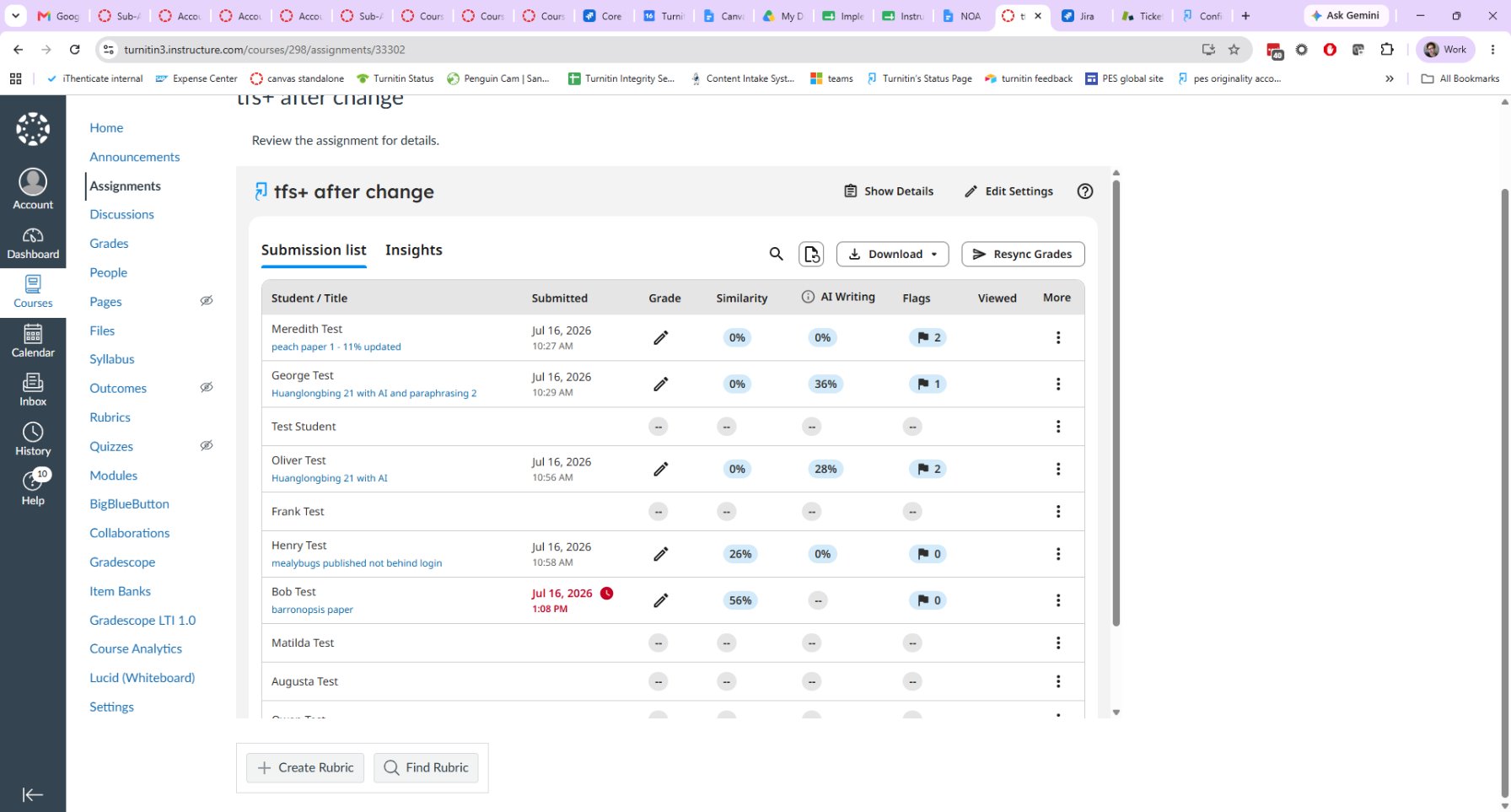
The “Advantage” of using the Turnitin assignment is the ability to see at a glance who has submitted, who has not, if there are any potential integrity issues for review prior to starting your feedback and grading. Instructors can easily manage submissions - including viewing submission times (including late submissions), adding extensions, submitting on behalf of the students, bulk downloading reports, and even seeing if the student has reviewed their feedback. And of course, it provides access to Turnitin’s feedback and grading tools, including time saving features such as Quickmarks (allowing simple save and re-use for frequent comments).
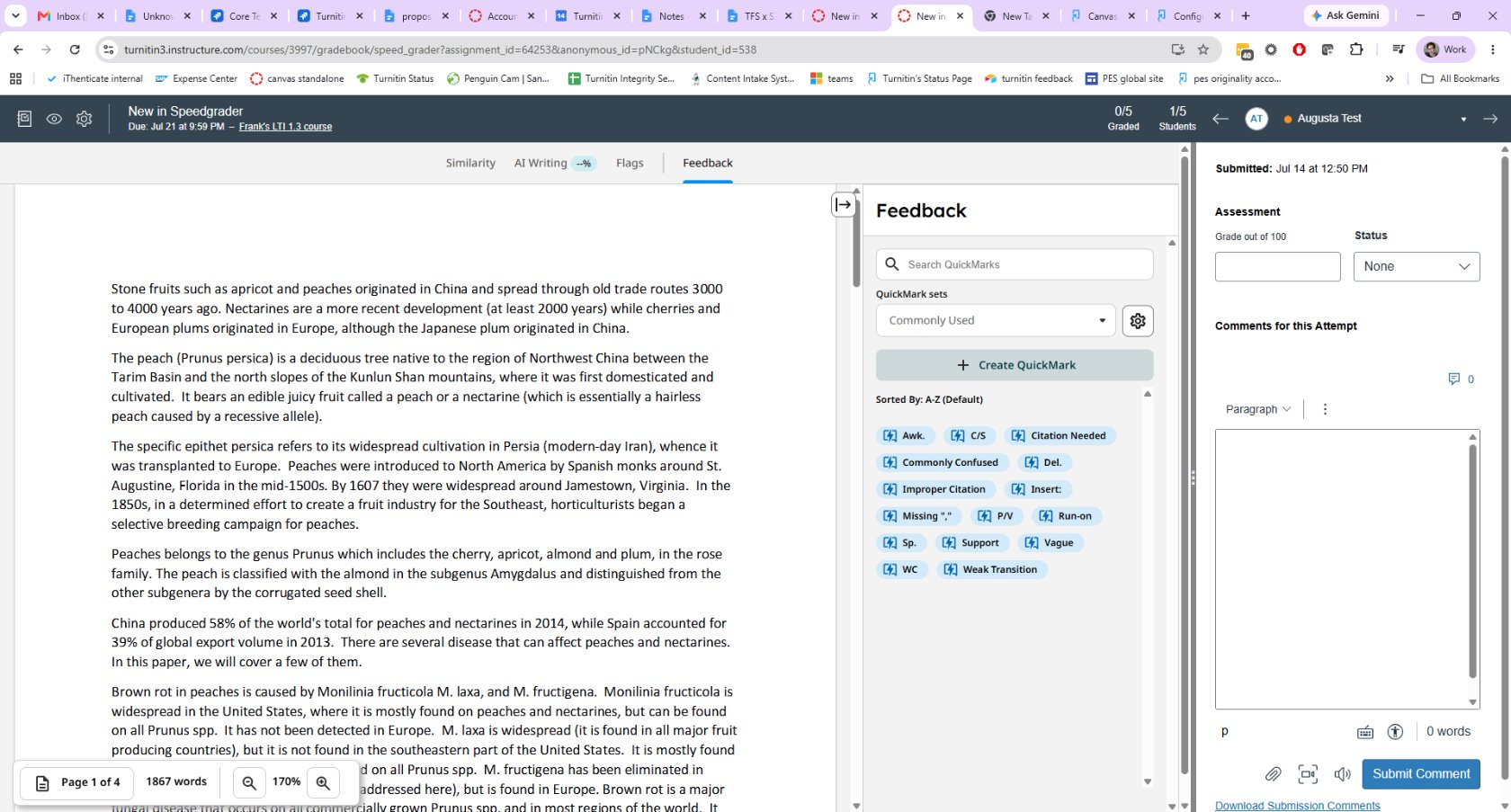
Starting this July, instructors can now view and grade these submissions in SpeedGrader while still providing feedback on the paper using Turnitin’s tools (including Quickmarks!). Within Speedgrader you will also be able to easily toggle between Turnitin’s AI writing reports (via Originality) and Similarity reports while SpeedGrader remains visible on the right. This best of both worlds solution gives you all the advantages of Turnitin’s integrity and feedback tools within a familiar SpeedGrader experience.
What is new with Canvas Plagiarism Framework?
Turnitin has long partnered with Instructure on ensuring educators have access to academic integrity checks within Canvas assignments and many customers use Canvas Plagiarism Framework (CPF) for this purpose. Recently, Canvas has added an alternate method for how third-party tools, like Turnitin, will integrate called Document Processor. Document Processor is a new LTI standards-based model for third-party integrators.
Over time they will be retiring the Canvas Plagiarism Framework, but there is no need for concern. Turnitin is working with Canvas to ensure a seamless migration from CPF to Document Processor. Your integrity checks will remain uninterrupted: Similarity and AI writing detection continue to run directly on native Canvas assignments as they did with CPF. You will have access to Turnitin Similarity and Originality (depending on your license) but with better visibility and improved access to the AI writing reports.
For instructors, this upgrade gives a seamless choice of which workflow is best for you. Whether you prefer the Turnitin Advantage workflow, or the Canvas assignment experience, your institution can support you. For Turnitin, this provides a solid and standards-based foundation to ensure we keep pace with your evolving needs and Canvas' own roadmap.
Note: For new customers, Turnitin recommends using Document Processor from day one. For existing customers, we'll have more to share on the migration path and complete guidance in August.
But wait! There’s more!
The improvements above are just the start. For those using our Turnitin Advantage integration for Turnitin Feedback Studio and Clarity, we have two more features coming soon:
• Multipart assignments: Educators crave greater visibility into the learning process of their students, and AI puts that need into overdrive. To help support this, we are delivering a multi-part assignment setup in early August. This allows instructors to create assignments with multiple activities to fit their unique learning goals and strategy while providing connected feedback and grades on each part individually.
• Canvas Rubric import: Bring existing Canvas rubrics straight into Turnitin’s standard assignment and Turnitin Clarity, with no need to rebuild them from scratch. For Turnitin Clarity customers, this offers the ability for our AI assistant to leverage your rubrics when interacting with students during their writing process.
We’re looking forward to delivering these improvements and more in the coming weeks and months. To stay up to date on the latest from Turnitin for Canvas customers, check out our roadmap.
About the author
Marlen Rattiner is an edtech leader with nearly two decades of expertise in product management, AI, and instructional design. As VP of Product Management at Turnitin, Marlen drives innovation in academic integrity, leading the team behind Turnitin Feedback Studio. This includes Turnitin’s Similarity and Originality reports, grading and feedback tools, integrations, and new innovations like Turnitin Clarity. Marlen previously served in product leadership roles at Blackboard and Wimba and holds a Masters degree in educational technology and instructional design from NYU.